> For the complete documentation index, see [llms.txt](https://gchandra.gitbook.io/data-warehousing/llms.txt). Markdown versions of documentation pages are available by appending `.md` to page URLs; this page is available as [Markdown](https://gchandra.gitbook.io/data-warehousing/rdbms/data-model/transaction.md).
# Transaction
### What is a Transaction?
A transaction can be defined as a group of tasks.
A simple task is the minimum processing unit that cannot be divided further.
**Example**: Transfer $500 from X account to Y account.
```
Open_Account(X)
Old_Balance = X.balance
New_Balance = Old_Balance - 500
X.balance = New_Balance
Close_Account(X)
Open_Account(Y)
Old_Balance = B.balance
New_Balance = Old_Balance + 500
Y.balance = New_Balance
Close_Account(Y)
```
### States of Transaction
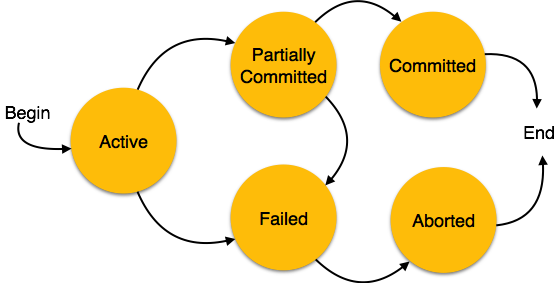
* **Active**: When the transaction's instructions are running, the transaction is active.
* **Partially Committed**: After completing all the read and write operations, the changes are made in the main memory or local buffer.
* **Committed**: It is the state in which the changes are made permanent on the DataBase.
* **Failed**: When any instruction of the transaction fails.
* **Aborted**: The changes are only made to the local buffer or main memory; hence, these changes are deleted.